
WELCOME, dear visitors! I would like to thank you for stopping by. Should you find this article useful, please share the link to my website with anyone who you think will benefit by reading it and subscribe to my RSS feed. THANKS!
So, I’ve had some more time to play with the latest build of Firefox, and I liked it so much that I couldn’t use the 1.5 version anymore. And this left me with a problem: hardly any of my extensions were compatible with the latest and greatest Firefox version.
I’ve made a bit of a research out of it, and here we are: I present you with the 3 ways to make extensions compatible with Firefox 2.0.
Firefox Books
If you like Firefox, you will find the following books extremely useful:
 |
  |
  |
First though, I’d like to give you a few warnings:
- not 100% of your extensions will work,some of the older ones would really be incompatible. But if you had Firefox 1.5, than I doubt you’ll have any problems.
- if you update any of the “made compatible” extensions using the automatic update function of Firefox, you may easily end up with an incompatible version again. This means you’ll probably have to make it compatible once more.
That said, I hope you will find useful at least one of the following ways to make old extensions Firefox 2.0 compatible. I’ve also given you the main advantage and disadvantage of using each of the methods.
1) Making Extensions Compatible – THE EASY WAY
All you have to do is to go and download a wonderful Nightly Tester Tools extension. Not only it is compatible with your newest Firefox version, but it will also add a button to your Extensions manager (Tools->Add-ons):
Just click this button and restart your browser. Please note that this is a screenshot taken AFTER making all the xtensions compatible – so as you can see they’re all active already.
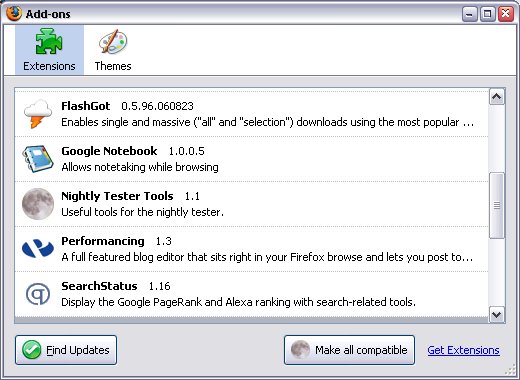
The advantage of this way is that it’s really easy to make all your extensions compatible with any Firefox until Firefox 3.0 (that’s what this extension puts as the MaxVersion for each of the extensions it fixes)
The disadvantage is that there is no equally easy way to revert the changes, so once “made compatible”, your extensions will stay this way – there is no button to make them uncompatible again. However, disabling the extension seems to restore the versions.
2) Making Extensions Compatible – THE FIREFOX GURU WAY
What you can do is open the configuration (about:config) in your Firefox browser, right click the list and create a boolean extensions.checkCompatibility option there. Set its value to false and restart the browser.
Most of your extensions should work now. If you go to the Add-ons dialog, it will look like this:
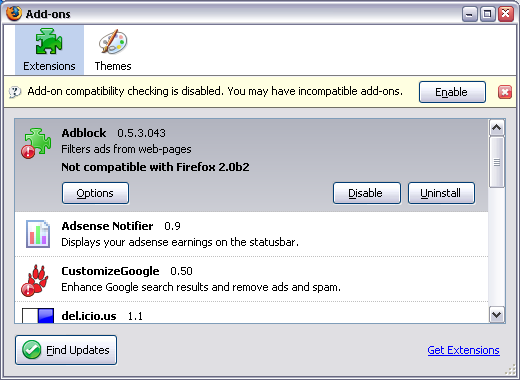
As you can see, extensions which would otherwise be incompatible, are flagged with the exclamation mark. You can also see a warning message which suggest you enable the compatibility check again.
The advantage of this approach is that it’s really simple to make the change which affects all the extensions.
The disadvantage is that this way can be used as a temporary solution only, as it may lead to unpredictable consequences (some really old or really new extensions may malfunction).
3) Making Extensions Compatible – THE HARD WAY
This is essentially a manual way of accomplishing the result of using the Nightly Tester Tools extension.
The advantage of this way is in total control over which extensions you’ll hack to become compatible.
The disadvantage is in the fact that every step of this method is rather hard: distinguishing extensions to make sure you’re changing the one you really want, and
manually changing the versions supported.
- Close your browser
- Go to the folder with all your Firefox extensions:
C:\Documents and Settings\USER\Application Data\Mozilla\Firefox\Profiles\PROFILE\extensions In this line, USER is to be replaced with your Windows login, and PROFILE will be the name of your Firefox profile (weird looking folder name, usually the only one found in Profiles folder) - You’ll see a list of folders there, 1 folder for each extension. The names of the folders are the unique identifiers for extensions, so they may seem scary at first:
{34274bf4-1d97-a289-e984-17e546307e4f} – this is the Adblock extension GUID. - Go to any folder, and open the install.rdf file for editing with your favorite clear text editor. Notepad works, but using it will make things even harder cause it doesn’t part rdf files properly. Your choice :) Now back to the business. You need to look for 2 things:
- name of the extension, to make sure you’re editing the right oneJust look for the em:name, and try to recognize the extension from the description that follows:
<!– Front End MetaData –>
<em:name>Adblock</em:name>
<em:description>Filters ads from web-pages</em:description>
<em:creator>The Adblock Crew</em:creator>
<em:contributor>Henrik Aasted Sorensen</em:contributor> - a block of minimal and maximum Firefox versions the extension will work on.
Warning: there could be few similar blocks with versions, so make sure you’ll edit the one which has EXACTLY this em:id, the one which belongs to Firefox browser: ec8030f7-c20a-464f-9b0e-13a3a9e97384.
<!– FireFox –>
<em:targetApplication>
<Description>
<em:id>{ec8030f7-c20a-464f-9b0e-13a3a9e97384}</em:id>
<em:minVersion>0.7</em:minVersion>
<em:maxVersion>1.5</em:maxVersion>
</Description>
</em:targetApplication> - name of the extension, to make sure you’re editing the right oneJust look for the em:name, and try to recognize the extension from the description that follows:
- Edit the maxVersion parameter (shown in bold to make it easier), and change it from 1.5 to 2.0b2.
- Remove the extensions.cache file from the C:\Documents and Settings\USER\Application Data\Mozilla\Firefox\Profiles\PROFILE\ folder – this will make sure Firefox will read all the changes from install.rdf files and pick up the now “compatible” extension
- Restart your browser, enable the previously disabled extension you’ve just edited
- Restart your browser again to activate this extension
There you have it. Enjoy!


Thank you for this article! I was wondering about this recently and here is the answer. Keep the great tips coming.
Thanks for stopping by to comment, Kelly! I\’m glad some of my tips are helpful.
See you around!
Great. Thank you!
You’re always welcome, Alfredo!
I think users can also download the fantastic extension, MR. Tech’s Local Install: http://www.mrtech.com/extensions/local_install/
In addition to adding a feature to “Make All Compatible,” the extension offers many other useful options for handling extensions–too many to list here. This extension makes a number of other FF extensions unnecessary. Highly recommended.
Brilliant, number 2 worked great. The only thing that stopped me using FF2 was my extensions not working.
Thanks Gleb, thanks StumbleUpon!
Thaaaaanks…I was looking for the first one, but here you have two more options THANKS!
Thanks for the tip, David!
PoscoChubb, Ricky: always a pleasure!
Very nice… Thanks for sharing…
Hi Keith, it was fun to research and I’m pleased so many people find it useful!
Very Nice, gets PlainOldFavorites working :-)\
Thanks !!!
great article, thank you for it.
there’s an extension called “extension manager extended” which includes in firefox’ extension manager window the unique identifier of each extension. it also adds a right-click context menu entry to open the selected extension’s folder.
it makes it a lot easier to use your method #3, since you don’t need to figure out which folder belongs to the extension you want to edit.
the “extension manager extended” can be found in https://addons.mozilla.org/firefox/2195/.
Thanks for the comment, Christian!
I think I’ll give this extension a try.
I’m quite partial to the third method, myself. It may take a bit of coding know how, but it’s a more permanent solution I think (especially for an amateur extension like Deviantart’s DeviantMessage which doesn’t get updated often).
Hi Jeff,
I agree. Some extensions are not dynamic enough, and if there are only a few – it is practical indeed to fix them yourself.
Thanks for sharing your experience! See you around!
Thanks, you saved my day!
Hi Eric!
Glad to have helped you :)
See you around!
Gleb
I didn’t know I’ve been doing it the hard way. Thanks for providing easier options. :)
Always a pleasure, Patricia!
Thnaks for the detailed description. Really usefull.
Always a pleasure! Come back fo more!
This surely fixed my Google Notifier add-on. Thanks.
I owe you. You made my 5 extensions work which were not working earlier.Dugg! Thanks
I owe you. You made my 5 extensions work which were not working earlier. Loved the third one in particular. Dugg! Thanks
Editing tip: You could just write “%UserProfile%\Application Data\Mozilla\Firefox\Profiles\PROFILE\extensions” instead of the full path. Windows will automatically move you to the correct user.
Works perfectly. Thank you very much!
There’s an extension called “extension manager extended†which includes in firefox’ extension manager window the unique identifier of each extension. it also adds a right-click context menu entry to open the selected extension’s folder.
he three way covers up so many details that u will end up either making ur old extensions!!
Игры на развитие логики для детей Игры на развитие логики для детей .
most bet скачать http://www.mostbet4.com.kg/ .