Since upgrading to WordPress 2.1, I’ve finally switched back to using the built-in posts editor. One of the reasons for doing this was that I’ve found the options I so needed – text justification and HTML code cleanup – available through the advanced editor options panel.
Pressing Shift+Alt+V in Firefox or Alt+V in Internet Explorer transforms your Standard Editor panel:
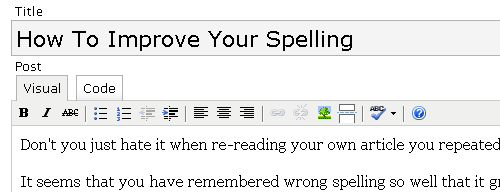
… into something like this:
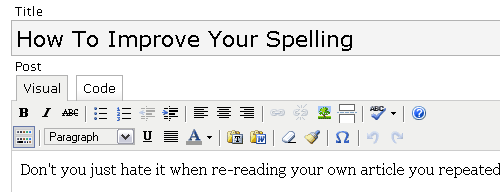
As you can see, there’s quite a few more options available, namely:
- paragraph formattion options (address, preformatted text, headings)
- underline your text
- full justification
- color selector for your text
- paste options for plain text and MS Word
- messy HTML code cleanup
- custom character button (charmap which allows you to click and insert any special character)
With all these options, there really is no reason to search for a better visual editor anymore. TinyMCE, which is the engine behind it, fits WordPress 2.1 like a glove, and makes editing your posts and pages a real pleasure.


Nice. Thanks for the heads up. I’m still waiting a bit on 2.1, testing it with my vast array of plugins in a ‘development’ domain. But I’m certainly going to play with the enhanced editor. Now if someone would write a plugin to let me interact with my styles sheet from a drop down.
Hi Dawud,
It makes sense to wait if you got many dependencies with plugins. I don’t, that’s why I decided to give it a go. Besides, having discovered these nice editor features available on one of my upgraded blogs, I couldn’t wait any longer and upgraded this one as well ;)
What kind of CSS interaction are you talking about? I’m going to attempt writing my first WP plugin soon enough, so maybe I can play with your idea?
Hey Gleb,
That’s cool, I didn’t know you could get the additional options in the editor. I must confess though, I didn’t read all of the documentation either. Naughty me. ;-)
Joe
Glad to have something you find useful, Joe!
I never read the documentation either, so it was as much a surprise to me :)
Thanks for this tip! So documentation is there for a reason after all ;)
Hi Anne,
Yes! Sometimes interesting things do really show up ;)
I’ve been using WPress for 3 years now. I never knew about this. THANK YOU.
Question though – Is there a way to force WordPress to remember my preference of the advanced editor?
I like it to default to this editor for myself and my clients…..