DaFont: Thousands of Fonts For Download

Just read about the DaFont resource once more, this time in Lifehacker's Find the perfect font post.

Not only does this resource has 6900+ fonts available for download, but it also has them all neatly organized and searchable by various font features.

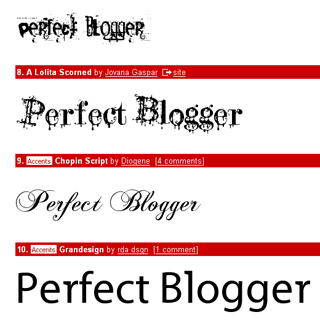
I particularly like the Top 100 fonts with the preview of your text:
Performancing Exchange Launch

Just got an email from Nick Wilson announcing the official launch of Performancing Exchange – a free classifieds-style marketplace for the professional blogging community.

Performancing Exchange is free for now, and so far it has the following classifieds categories (seeing how dynamic Performancing.com community is, I have no doubt this list will grown):

  • Bloggers for hire
  • Bloggers wanted
  • Blogs for sale
  • Services offered
  • Services wanted
  • Micellaneous

Exchange has its own voting system, so worthy posts would be voted for and brought to the top of the Performancing Exchange homepage. Only logged in Performancing users can vote for the moment.

User profiles have been extended to include your professional skills now – you can specify your primary blog name and URL, and list your professional skills. There is also an option to flag whether you're currently available for hire or not.

I like the whole idea a lot! I believe it has great future, and it's definitely going to be an interesting resource to visit, whether you're looking for a job in blogging or simply want to know what the latest trends are. Not being a very active Performancing community member just yet, I'm still very proud to be a part of it.

Google Analytics is Finally Open

Great news!


Starting yesterday, new users can get an instant registration with Google Analytics service. Previously users had to submit their request and wait for the Google Analytics team to get back to them with an approval of the registration and a special invitation code.

According to the official blog, from now on the Google Analytics service is fully open to the public and you can get started in a matter of minutes.


I'm working on a Google Analytics page in the Blogging Tools section of PerfectBlogger, and I'll be sure to let you all know as soon as I update this page.   

Sidebar Fixed for Internet Explorer users

I've just noticed that the right sidebar wasn't shown properly in IE. After some quick fixes, it seems to be back up, but the whole page still doesn't show properly in IE compared to the perfection of its Firefox image.

Design isn't going to be a priority of mine for at least a short while, but if you notice any functionality broken – please let me know and I'll try and fix it. Thanks!

Blogger Beta

The most popular blogging website, Blogger, has just announced a new beta version of their service. It looks like developers have listened well and worked hard to please their bloggers. To help you learn new service features, there is a tour with highlights of the most interesting newly made improvements.


For the moment, only a limited number of existing blogger.com users can switch over to the new beta (you should see a link on your Blogger dashboard), but it is promised that eventually everyone will be able to enjoy the new version of the service. Everyone is invited to register a new beta account to try all the improvements out, and it's possible to use your existing Google account for logging in.


Some of the new features are:

  • Improved dashboard

  • Labels (categories) you can assign to each post 
    In the Posting dialogue, you have a text field for a comma-separated list of your labels. The default layout of your new blog will not have a list of labels, but you can easily change this by editing your blog template and adding a Labels page element. You can set the name of this page element to anything you like, and you will also have the option to sort your labels list alphabetically or by a number of posts with each label.
  • Private blog
    You can now limit access to your blog, by closing it to the public access and inviting your friends by email. Each of them will get an invitation with a unique ID in the URL, so that they'll have an option of either viewing your blog in guest mode for up to 30 days, or to associate this invitation with their existing Google account. Obviously, there is an option of easily creating a Google account as well.
  • Better blog layout
    It is possible now to drag-and-drop page elements in the layout editor, and generally it's much easier to customize your blog's template
  • Feeds support improved
    RSS 2.0 and Atom 1.0 are both supported now, and there's more flexibility in controlling your feeds (you can have a separate feed for all your comments, or provide feeds for comments to each entry)


To learn more, please read the New Features section of the Blogger Help site.

When You Should Put Ads On Your Blog

I once read a wonderful article on ProBlogger about the hard decision most bloggers come to face sooner or later: How Quickly After Starting A Blog Should I Put Ads On It? Funny enough, I’ve been asking myself this very same question almost every time I started a new blog.

I think it’s best to show at least some ads right away. That’s what I did on one recent blog of mine: Personal Development Ideas.

Here’s why I think you should have at least some put on your blog from day one:

  • be honest with your readers
    If you’re planning on using ads in the future, do show at least some of them. Some blog readers don’t like ads at all, and they might get really irritated when you start showing ads some time down the line. So it’s best to show at least some ads and make them visible from the beginning. Those readers who like your content and find your blog useful enough, will still be regularly visiting you.
  • design
    If you have to incorporate ads into your blog’s design, it’s best to do it at the very beginning. This way, you will not find yourself with a brand new design and no way to incorporate your ads into it. With your ads shown on your initial blog design, you’ll make sure to keep ads placement planned when you’re working on your new blog designs
  • experiments
    It’s best to start experimenting with ads placement as early as possible. While you will not see any major differences simply because your traffic will not be high enough, you will have an advantage, too – because there will be only a handful of pages and ads, it will be easier to see which pages are more popular and which ads will generate you some income

I’ve seen a very useful comment to the article above, which advised to only put ads for the old (archives, for instance) pages, and not the very recent ones.

It actually makes perfect sense. Instead of annoying your visitors with completely irrelevant ads (because AdSense ads will only make sense and be relevant after your pages are fully indexed), why not wait for Google to index you and then try again just a few months later?

5 Reasons Why AdSense Link Units Work So Well

I've recently discovered link units for myself, and having tried them out on a couple of my blogs, I highly recommend you give them a try. If you still don't know what link units are, please visit this page: https://www.google.com/adsense/adformats.

In fact, now that I look back at the half a year of my AdSense experiments, I don't understand how I could start with something else and not link units – they're so simple to add and integrate into your blog design, yet so effective that they're bound to make any page with a decent content earn you some money!


Imagine yourself as your website visitor 

The reason I never tried link units originally is because I couldn't understand why someone would want to click them. As all the webmasters and usability experts say, you've got to look at your website with the eyes of a visitor. Not only you should do this, but it is also recommended to imagine yourself both a random and a targeted visitor – cause they really are two quite different flows of traffic for your website.

So doing such an analysis and trying out all kinds of visitors in my imagination, I just could not understand why I would like clicking the link units. It would make so much more sense to me to click a text ad which shows you the URL and gives you a short description of the website you're about to get to. So it made no sense to me, and having spent few hours over the course of a week or two thinking about link units, I did eventually give the idea up.

Few months later though, having tried few other AdSense formats, I've decided to give link units another go simply out of interest. I was pretty amazed to see that quite a number of my visitors DID click link units and not only that, but also followed up and clicked some of the links provided by Google when you click on a keyword in a link unit.

Now I believe I've finally figured out why link units work. This is because of the number of factors:


  1. Link units look promising
    Indeed, most of link units look like some kind of a menu. Some websites integrate them so well, that they completely blend in with the rest of menus – so that visitors click link units as easily as they click any other menu item.

    It had been noticed that using a Link Unit closer to the top page makes it look like a menu bar so much that it greatly improves the click rate, while if you were to place the same Link Unit closer to the middle of your page, it may have no impact and attract no clicks at all.

  2. Link units are neat and compact

    Link units are probably the easiest AdSense ads to integrate into your website design. There's quite a number of formats for these units, so make up your mind and start experimenting

  3. Link units deliver results

    Essentially, link units are keywords – the most relevant ones to the current content, according to Google. And clicking on any of these keywords will bring you to more relevant results to click on. Visitors see the keywords and they immediately get an idea of what kinds of links they're going to get when they click link units.

  4. Link units are not overloaded with URL descriptions

    This is probably one of the most important things to understand about AdSense link units. I believe I haven't tried link units before exactly because of this reason. I did not understand why visitors would click on some keywords that they might have an idea about but no exact knowledge of what results they're going to get. But then I had realised that this also serves as an additional attraction – visitors click on link units EXACTLY because they don't know how good or bad results they're going to get. In contrast, when they see a full-scale text ad, they read the description of a link, and they may immediately decide not to follow the link because they don't want to visit a particular site. But with link units, they have to click to get the list of URLs with their descriptions

  5. Link units are different

    When users click link units, they get a page with relevant ads in a form of Google search results. This list of URLs does not look like an ad at all – it's in a form of a list of potentially useful resources which your visitor might find helpful. I believe there's something psychological behind this representation of ads, because users seem to be more willingly clicking such ads compared to how standard AdSense ads perform.


That's all for today. Good luck with your AdSense experiments, and be sure to let me know how you progress!

Challenges Facing Blogs

Darren Rowse at ProBlogger posted a list of Challenges Facing Young and Older Blogs today,  and I just wanted to point you to his post and also add some thoughts of my own.

I think, Disillusionment with a Niche is as big and as serious a problem for new bloggers as it is for older ones.

Recently, I see far too many bloggers starting new blogs in search of a quick passive income opportunity – they misjudge the niche and raise their expectations too high. Not only are they hoping to earn top dollar starting with the day one, but they also expect it to happen almost automatically, assuming they're going to rank high in the niche.

The reality is though, that it takes a fairly long time to establish a reputation and get regular visitors for any project. Even if you're a gifted writer with incredibly interesting and relevant ideas, it might take you few month to get regular traffic, firstly because of the Google indexing delay (your pages are indexed almost instantly, but they usually are not shown in Google search results for a month or two), and secondly is because traffic brings traffic. So if you have major resources pointing to your new project, you'll grow pretty quick.

Of course, the irony is that usually you have to write lots of useful content, earn the trust and respect, and get some initial traffic before any of the major projects out there will notice you and start linking to you :)

Performancing Firefox 1.3 Final

The latest version of Performancing for Firefox (PFF) – 1.3 final, has just been released.

Performancing for Firefox is a great blog editor. It's a wonderful extension for your Firefox browser which has multiple blogs support

Jed Brown has an extensive post explaining new features and APIs of this Performancing Firefox version. Please have a look: Performancing Firefox 1.3 Final!

I've also created a page for Performancing Firefox in the Editors section of my Blogging Tools, just follow this link: Performancing Firefox.

AdWords: How Fictitious Clicks Occur

I've just read a very interesting post on AdWords Blog which will be useful for both bloggers and other AdWords publishers: Troubling Findings on How Some Third Parties Detect Click Fraud.

Most useful information can  be found not in the post itself, but in the detailed analysis document posted by the Click Quality Team of Google: Report on Third Party Click Fraud Auditing (PDF).

These are the two key findings explained:

  • Fictitious ad clicks because of mischaracterizing events. This finding may be the most significant flaw responsible for exaggerated click fraud claims. The problem lies in the fact that many click fraud consultants don’t count actual ad clicks. Rather, to determine the number of ad clicks, they use a number of other signals, including counting visits to a particular webpage. As a result, the consultants count page reloads and subsequent visits on an advertiser’s site as multiple clicks on the advertiser’s Google ad. This generates fictitious ad clicks in the consultant’s reports. For example, if a user browses deeper into an advertiser’s site, then hits the back button, this causes a potential reload of the original landing page, which a consultant would record as an additional ad click – even though no Google ad click actually occurred.

  • Fictitious ad clicks due to conflation across advertisers and ad networks. Some consultants “cookie” users and track their activity across their network of client advertisers. One often-used consultant implements the cookie in such a way that clicks on Yahoo ads can be counted as clicks on Google ads, and vice versa.

Click fraud had been an increasing concern for many AdWords publishers lately, and I think it's very important to read such reports to understand that some click fraud audits are not accurate. There is clearly a problem with fraudulent clicks, but it's definitely not as big as some companies claim.