A very quick update today: just like I promised a few days ago, I've added a Glossary Updates section to the left menu, it now shows the 10 most recently added or updated Blogging Glossary articles, and also shows you the total number of definitions found in the glossary.
Blogging Glossary: Google Sitemaps Definition
August 31, 2006 by Leave a Comment
I haven't found an easy enough way to highlight the most recent updates to the Blogging Glossary, and so I'll probably be announcing some of the articles there until a better way is found.
I've just created a page with a definition of Google Sitemaps which I think you may find useful, especially if you're new to this technology. Please have a look here: Blogging Glossary: Sitemap.
pS: I'm planning to implement a sidebar plugin which will show a total counter of all the articles in the Blogging Glossary, and will also give a list of the ones most recently created/updated ones. Do you think such a feature will be useful for you? Do you have any other ideas or suggestions? Please let me know! Thanks!
Blogging Glossary Progress
August 28, 2006 by Leave a Comment
Just wanted to highlight the progress I'm making with the Blogging Glossary. I don't like creating practically empty place holders for various blogging terms, so the rate of growth isn't shocking just yet ;)
Still, there are some articles you can already find useful, especially if you're just getting started with blogging:
- obviously, a blog definition
- a short article on feed readers – aggregators
- my explanation of what trackback is and how to use it
- descriptions of permalink and URL
If you want these articles updated, please let me know. Also, if there are some particular blogging terms you'd like me to concentrate on, just mention them in comments to this entry and I'll be sure to cover them first – after all, it doesn't matter what to start with, as I'll try and cover as much as I can.
Blogger Jobs at ProBlogger
August 23, 2006 by 4 Comments
Excellent! I've just read an announcement that Darren Rowse has opened up a new service on his ProBlogger website.
This time, it's a job board service, where you'll be able to offer or find a job in blogging. Knowing how popular ProBlogger is, I have no doubts this board will be a success.
WordPress Tutorials by cre8d design
August 20, 2006 by 2 Comments
Rachel Cunliffe in her cre8d design blog just posted a wonderful WordPress Quick Screencast Tutorial, Part 1.
Part One is a half-an-hour video tutorial showing you how to set up a brand new blog of yours. It covers such topics as downloading the freeware FTP software and using it to upload your WordPress blogging engine to your hosting provider. The tutorial also explains what posts and categories are, and shows you how to quickly create the very first post of yours. There is also quite a number of quick tips on getting started with your WordPress blog.
Well done, Rachel! It's always much better to show how to do something, and I think this 30min video covers what could possibly take pages and pages of online tutorials.
For any of you just thinking of setting a new blog up – this is one video you must watch!
The second part of the tutorial is expected soon, so I'll probably just update this post when it's available for you to download.
DaFont: Thousands of Fonts For Download
August 17, 2006 by Leave a Comment
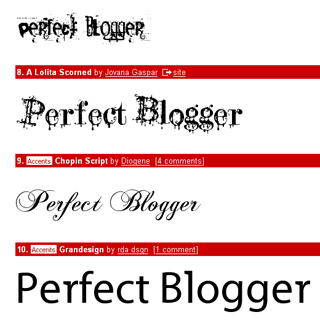
Just read about the DaFont resource once more, this time in Lifehacker's Find the perfect font post.
Not only does this resource has 6900+ fonts available for download, but it also has them all neatly organized and searchable by various font features.
I particularly like the Top 100 fonts with the preview of your text:
Performancing Exchange Launch
August 16, 2006 by Leave a Comment
Just got an email from Nick Wilson announcing the official launch of Performancing Exchange – a free classifieds-style marketplace for the professional blogging community.
Performancing Exchange is free for now, and so far it has the following classifieds categories (seeing how dynamic Performancing.com community is, I have no doubt this list will grown):
- Bloggers for hire
- Bloggers wanted
- Blogs for sale
- Services offered
- Services wanted
- Micellaneous
Exchange has its own voting system, so worthy posts would be voted for and brought to the top of the Performancing Exchange homepage. Only logged in Performancing users can vote for the moment.
User profiles have been extended to include your professional skills now – you can specify your primary blog name and URL, and list your professional skills. There is also an option to flag whether you're currently available for hire or not.
I like the whole idea a lot! I believe it has great future, and it's definitely going to be an interesting resource to visit, whether you're looking for a job in blogging or simply want to know what the latest trends are. Not being a very active Performancing community member just yet, I'm still very proud to be a part of it.
Google Analytics is Finally Open
August 16, 2006 by Leave a Comment
Great news!
Starting yesterday, new users can get an instant registration with Google Analytics service. Previously users had to submit their request and wait for the Google Analytics team to get back to them with an approval of the registration and a special invitation code.
According to the official blog, from now on the Google Analytics service is fully open to the public and you can get started in a matter of minutes.
I'm working on a Google Analytics page in the Blogging Tools section of PerfectBlogger, and I'll be sure to let you all know as soon as I update this page.
Sidebar Fixed for Internet Explorer users
August 16, 2006 by Leave a Comment
I've just noticed that the right sidebar wasn't shown properly in IE. After some quick fixes, it seems to be back up, but the whole page still doesn't show properly in IE compared to the perfection of its Firefox image.
Design isn't going to be a priority of mine for at least a short while, but if you notice any functionality broken – please let me know and I'll try and fix it. Thanks!
Blogger Beta
August 15, 2006 by Leave a Comment
The most popular blogging website, Blogger, has just announced a new beta version of their service. It looks like developers have listened well and worked hard to please their bloggers. To help you learn new service features, there is a tour with highlights of the most interesting newly made improvements.
For the moment, only a limited number of existing blogger.com users can switch over to the new beta (you should see a link on your Blogger dashboard), but it is promised that eventually everyone will be able to enjoy the new version of the service. Everyone is invited to register a new beta account to try all the improvements out, and it's possible to use your existing Google account for logging in.
Some of the new features are:
- Improved dashboard
- Labels (categories) you can assign to each post
In the Posting dialogue, you have a text field for a comma-separated list of your labels. The default layout of your new blog will not have a list of labels, but you can easily change this by editing your blog template and adding a Labels page element. You can set the name of this page element to anything you like, and you will also have the option to sort your labels list alphabetically or by a number of posts with each label. - Private blog
You can now limit access to your blog, by closing it to the public access and inviting your friends by email. Each of them will get an invitation with a unique ID in the URL, so that they'll have an option of either viewing your blog in guest mode for up to 30 days, or to associate this invitation with their existing Google account. Obviously, there is an option of easily creating a Google account as well. - Better blog layout
It is possible now to drag-and-drop page elements in the layout editor, and generally it's much easier to customize your blog's template - Feeds support improved
RSS 2.0 and Atom 1.0 are both supported now, and there's more flexibility in controlling your feeds (you can have a separate feed for all your comments, or provide feeds for comments to each entry)
To learn more, please read the New Features section of the Blogger Help site.


Recent Comments