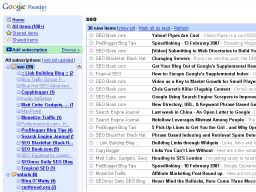
If you’re like me, you’ve got more than a hundred of RSS feeds in your favorite online RSS reader. If you’re also subscribed to some really active blogs like Lifehacker, which on average post 5-15 times a day, then your average number of unread posts will be around 100-120 each morning.
Now, you could try and honestly read each on of them. Will take you a few hours even if you read quick enough.
Another alternative is to skim through. Will be a bit faster, but still about an hour for 100+ posts.
Finally, you can minimize content to headlines only, and then you’ll be able to quickly run through all the posts titles and mark or open for further reading only things you’re interseted in.
But my ultimate solution to reading many RSS feeds a day is even a step further: use folders (in Google Reader), categories or tags – whatever it is called in your favorite RSS reader. Use this option which allows you group your feeds by a subject or level of importance.
The idea is this: if you sort all your RSS feeds into categories, you’ll be able to read/skim through posts on a particular subject only. This, in turn, will save you time because you don’t have to switch context all the time.
Here’s how it compares to reading all the headlines in one large list: as you go through titles of various posts on technology, productivity, graphics design, music and all the rest of your personal interests, you will automatically have to switch between subjects these titles are talking about. And it does take a few seconds for your brain to fully switch the context, recover a few latest news from the subject you’re switching to, and analyze the importance and relevance of a particular post title you’re looking at.
So my RSS productivity tip is this: place your feeds into categories, and you’ll save time because your brain won’t have to switch context when going through titles of new posts.
Aim to have 5-6 large categories with 20+ most interesting blogs and possibly another 6-10 smaller categories comprised of less important feeds.
This way, you’ll be able to run through all of them in just a few minutes, and mark stuff you’re not interested in as something you’ve already read.
At this point, you can either go ahead and read posts in each category (again, it will be faster cause topics are probably similar), or go and read all the posts from various categories in a much shorter list of only titles you’re interested in.

 Yet another update of WordPress has been posted yesterday:


Recent Comments