Questions To Ask Yourself Before Starting A Blog, Part 1

If you're new to blogging and you're just thinking about starting your own blog somewhere on the web, this series of articles is for you. 

So you have decided to start your own blog. To me, this means that you probably have some needs this blog is supposed to serve, and that you have most likely thought about you blog purpose in general. I simply want to make sure that you have given it all a proper thought. So, to make your life a little bit easier, I've prepared a list of the most obvious questions to ask yourself before starting a blog.

Today I'm going to ask you the first three questions.

1) What is your blog about?

You have to pick a niche for your blogging, and try your best to stay within the defined set of topics. There are few reasons for this:

– you're better off blogging about a subject you're familiar with. If your posts don't make any sense or don't provide your visitors with any value, no one will read you

– people will ask the same question as they stumble upon your blog. Unless it's an easy enough answer for them, they will not know why they want to
read you

– without a clear understanding of the purpose of your blog, you will not be able to share the knowledge or achieve other blogging goals you might must have

2) Do you really need (want) a blog?

I mean, have you considered any other options of putting your content online, and came to the idea of having a blog this way?

Surely, blogs are among the easiest ways to present content these days, but you have to be absolutely sure that blog is really the way you want your website to be.

If in doubt, read some definitions of a blog. Start here if you like: Glossary: Blog.


3) Do you have time to blog?

It takes only few days to realize one of the most crucial features of any blog – a regular update of the content. Unless you have the time to post regularly, your blog isn't going to grow and gain popularity.

You don't have to be posting 5 articles a day, but once a day is the most recommended approach. I myself haven't been following this rule yet, and this is the only reason the readership of this blog grows so slowly.

Just remember: it's not about frequency, but about being regular. People will be coming back to your blog when they expect new content to be posted. If it's once a week – that's fine, as long as it happens every week.

Yes, there are some fairly successful blogs out there which aren't very regular, but they actually miss out on traffic and visitors because of their irregular posting.

This concludes the first part of my Questions To Ask Yourself Before Starting A Blog series. I will post more in the coming weeks. Please feel free to let me know your answers to the above questions, or suggest more questions which you believe to be important for any blogger.
Tiger Administration v3.0

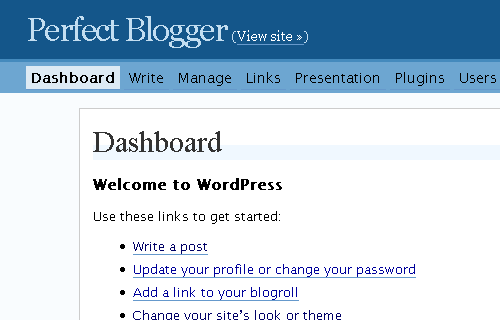
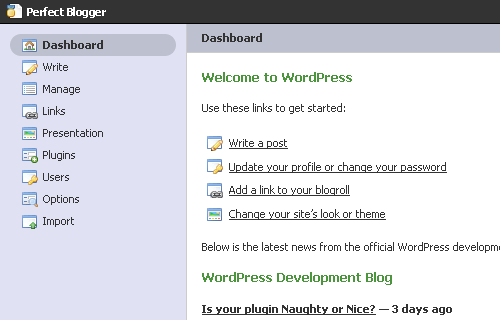
Steve Smith from Ordered List has just made my day. He's finally released his WP Tiger Administration v3.0 plugin, which completely changes your WordPress-powered blog administration experience. It's hard to believe, but all the improvements are done using CSS2 only, no change to XHTML templates were made.

I've been watching this plugin for quite some time, but today I have gone and actually installed it. See for yourself how different my new experience is!

This is how my WP admin panel looked before:

 Perfect Blogger Admin Panel - Before


And that's how it looks now!

Perfect Blogger Admin Panel - After 

Like it? Then go visit the plugin page and download it yourself: WP Tiger Administration v3.0.

Thanks a lot, Steve! 

Create New Color Schemes With Online Tools

I'm currently working on a new design for my Personal Development Ideas blog, and since I plan to pick a new color scheme for it, I've done some research and found a few excellent online resources to help you find the best color scheme for your design.

Here are the tools I recommend. All of them give you a color scheme as a result, and allow you to copy the hex values of each color:

Color Schemer
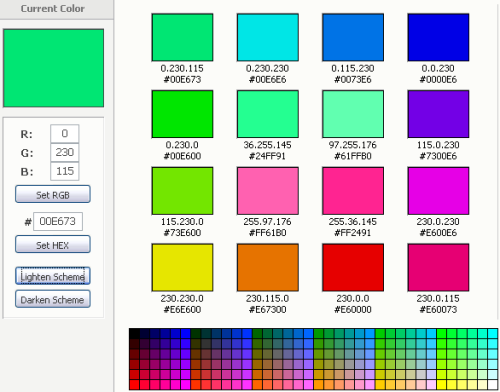
It's an online tool from a well-known publisher of the Color Schemer Studio – a software for Windows and MacOS platforms. If you're serious about your new color scheme, you'll probably benefit most from downloading the software, but basic experiments can be simplified with their online tool.

Color Schemer

As you can see, the idea is built around you picking a current color, and then the tool will suggest you matching colors based on its algorithm. Using the "Lighten Scheme" and "Darken Scheme", you can change the contrast of a scheme.

Color Scheme Chooser
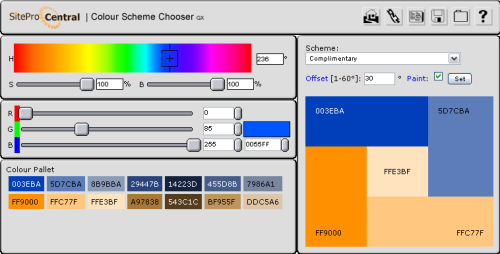
This is a free online tool from SitePro Central. Not only does this tool offer you great functionality, but it is also possible to place the tool on your own webpage using the provided HTML code.

Color Scheme chooser

You can probably see from the screenshot, that this tool offers you even more flexibility in choosing your base color. In addition to this, you get a choice of color scheme definitions, which allows you use the same base color to produce different color schemes – based on analogic, complimentary, split complimentary, triadic and double contrast approaches for picking colors.

Colormatch Redux
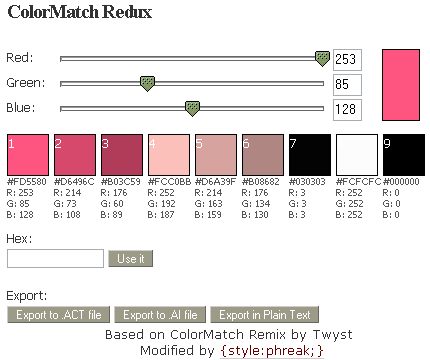
This tool from Style:Phreak, while having probably the simplest interface of all, has pleasantly surprised me by its choice of export options – for example, you can have it export all the colors of a current scheme into a clear text file. But the best export option is to save the scheme as a Photoshop color swatch file. Really handy!

Colormatch Redux

Color Scheme Generator 2
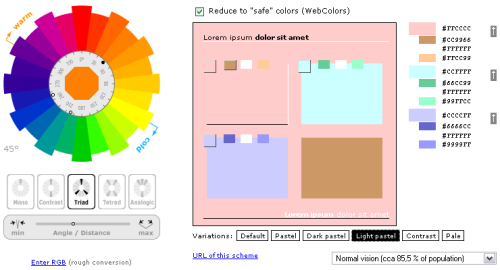
This tool has a very interesting way of picking colors and gives you more precise control of the angle for the tool to pick opposite colors for your scheme. There is also a number of variations available to slightly alter your scheme – Default, Pastel, Dark Pastel, Light Pastel, Constrast and Pale.

 Color Scheme Generator

That's it for today. Hope you find this round-up useful! If you know any more online color scheme tools worth including, please let me know by leaving a comment!

Amazon Updates aStores

I've recently started using Amazon's affiliate program, particularly the aStore. It has proven to be a rather interesting way to help your visitors buy selected products from Amazon, and I'm fairly happy with overall aStore performance.

I've just received an email from Amazon, stating that aStore feature has just got a whole lot better:

With this version of aStore you can now:

  • Build and maintain multiple aStores under one Associate ID
  • Feature up to 54 products in each category
  • Create custom categories containing products from multiple Amazon categories
  • Create multiple instances of individual Amazon categories
  • Control the display order of the products on each page
  • Specify products to feature on Category and Subcategory pages
  • Populate products to categories using Listmania lists

I think the best new feature is multiple aStores under the same Associate ID. It will save you a lot of trouble if you're supporting a number of aStores for your websites. The next best feature is probably custom categories. And the last feature I really like is abilitiy to control the display order of products on each page.

I'm going to test these new features on my Books on Personal Development aStore in the coming few days, and will make sure I post a follow-up with my impressions of all the new features of this upgrade.

WordPress 2.0.5 released

That's it, folks! The next version of WordPress – 2.0.5, codenamed Ronan, is finally available for download. For those of you who haven't seen the highlights of changes in this version, I strongly recommend you to have a look at a summary post by Mark Jaquith, Changes in WordPress 2.0.5

According to the announcement, this version brings fixes to 50 or so bugs, which alone is quite an effort giving the complexity of this ever-evolving blog engine.


Firefox 2 release already available for download

Thanks to Ryan from CyberNet Technology News, I've just downloaded the latest Firefox 2 build from the releases folder. It has no RC in the filename, so it's as close to the release (scheduled for tomorrow) as it gets :)

You can download Firefox 2 release from here: Firefox 2 @ releases.mozilla.org.

Speedlinking – 21/10/2006

It's Saturday again, and this means I have a few articles I'd like to share with you. I'm sure you will find them useful.


Darren Rowse has created a list of all the RSS advertising options available to you at this moment. As always, he adds his own opinion and short description which is the most valuable feature of his posts. Thanks, Darren! I think as soon as I gain enough readership for my feeds, I'll be definitely considering one of the options he listed.

Joe Hauckes from Working at Home on the Internet shares his thoughs on overly aggressive ads placement with blogs in his How To Lose A Visitor Before They Become A Reader article:

This particular Blog had an ad in every Hot Spot and a few of the Cooler Spots, and even some of the Spots that were Below Freezing. I understand the need to use advertisements for income and support of the site, but at least allow people to see the Name of the Blog without being slammed in the face by Flashing Banners.


I absolutely agree. You've probably noticed me using AdSense as well, but I try and not make it block the actual content. I strongly believe that any online project should provide tons of useful content before making any attempt to financially benefit from it through ads.

Internet Explorer 7

Just learned from Ryan's post at CyberNet that IE7 is officially released, and thought I'd mention this here for historical purpose: Internet Explorer 7 is available for download.

I don't think I'll even try it, cause I'm a solid Firefox guy, but for everyone interested, here's some useful info:

Internet Explorer 7 – direct download links:

32-bit versions: IE7 – Windows XP and IE7 – Windows Server 2003
64-bit versions: IE7 – Windows XP/Server 2003

Internet Explorer blog: IEBlog @ blogs.msdn.com

Ms. Dewey: A Sexy Search Engine

If you haven't seen this search engine yet, go check it out: Ms. Dewey is a fairly interactive search engine with a sexy girl sharing her wisdom based on your search queries.

Try searching for some general yet very deep topics like love, life, work or woman. I'm sure it's only a matter of time before there's a list of the best search queries for Ms Dewey is posted on one of the websites, but even now search is fun and interesting.

It's not a new idea, but definitely a successful, witty and funny implementation.

Ms. Dewey is definitely worth a look!

Speedlinking – 14/10/2006

Just thought it's about time I start sharing some of the useful posts I come across during my week.


Here are a few for the past week: 

Rajesh Setty from Life Beyond Code has written a very good article: 10 things they didn't tell you about blogging. Some of the points he made are simply brilliant, for example this one:

You can't get rich blogging.

Again, there are exceptions. Then, you don't include Las Vegas and Lottery in your growth strategy. Do you?

It did make me laugh. Surely, there is a different "rich" definition for every one of us, but in general he's right. It takes a lot of effort and time to get so good in blogging that it pays you enough to live off it. 

It's easy to start but hard to maintain.

In fact, it is VERY hard to maintain. Since most bloggers are not depending on blogging for their living, it is walking an extra mile almost everyday. Plus, how do you motivate yourself to do something that does not have a short-term return?

Again, a very common problem. You've got to be really passionate about your blog's topic, otherwise you will not be able to stay motivated for long enough to see it gain traffic and your readers start commenting and motivate you to write more. 

A few days later, Rajesh had posted another 10 things they didn't tell you about blogging, sharing some more of his experience with us:

Don't write if you don't have anything to write

You know – writers block affects bloggers too. It is REALLY OK to not post anything if you don't have anything valuable to post. Weak posts bring down the average value of your posts. Why take that risk?

The reason that you write should not be because you have a blog but because you have something valuable to contribute.

I totally agree on this one. I'm constantly struggling with myself over days of quietness on my blogs – whenever I don't have enough time to share an idea or some knowledge in a quality article. At first you feel really compelled to post ANYTHING, because your blogs have to appear dynamic and regularly updated. But when you realize that a weak post will have a much more negative impact than no post at all, you eventually learn to be patient.


Chris Pearson shared his observations after his website had finally got out of the Google Sandbox (congratulations!), and compiled a Graphical Look at the Effects of the Google Sandbox:

It really is amazing how powerful Google is in terms of pushing traffic all over the Web. I have literally been wowed by the rate at which my traffic and other metrics have increased over the last two months, which is basically the time frame in which I crawled out of the Google sandbox.

If you're interested in learning more about Google sandbox and ways to get out of it, I have previously posted an article about it, so please have a look: Simple Ways To Get Out Of Google Sandbox.


And last, but certainly not the least, is Paul Scrivens, explaining to some of us Why Your Web App Sucks with well-known examples. And excellent read with some links to other interesting articles from the same Wisdump site:

The reason it is so hard to make a great web application is because it is so easy to make it suck. The greatest ideas do not always translate into the greatest applications because of poor execution.


That should make 10 minutes of your reading today worthwhile. Enjoy!